A test store that behaves like a real one
An empty dev store makes every report look flat. Hand-made orders all land today and never get refunded. shopgen plans a whole history from a small JSON profile, then creates it safely.
Realistic shape
Growth trends, day-of-week and hour-of-day curves, spikes, noise, best sellers and loyal repeat buyers.
Reproducible
Same profile and catalog, same orders, every time. A plan is a pure, seeded function of its inputs.
Survives overnight runs
Paced to Shopify's 5-per-minute dev-store limit. Stop, crash or kill -9 it: resume leaves no gaps and no duplicates.
Dev-store safe
Refuses non-dev stores, checks scopes before writing, never emails anyone and never touches inventory.
Tokens handled
Use a shpat_ token, or let shopgen mint and refresh 24-hour tokens from a Dev Dashboard app.
Clean up in one command
purge deletes only the orders and customers shopgen tagged, for one run or all of them.
Check, preview, create, clean up
-
Check
Credentials, dev-store flag, scopes and catalog, without writing anything.
shopgen doctor -
Preview
See volume, revenue, outcomes and run time for your profile.
shopgen plan -
Create
Smoke test with a few orders, then backfill the whole history.
shopgen run --limit 3 -
Clean up
Remove everything a run created when you're done.
shopgen purge --run <id>
Overview#
Quick start#
1. Install. With Go 1.24 or later:
or download a binary from Releases.
2. Connect a dev store. Create a development store with a few active products, and an app with the read_products, write_orders and write_customers Admin API scopes. docs/shopify-setup.md walks through it. Then give shopgen one of:
export SHOPIFY_STORE=my-dev-store            # .myshopify.com is added for you

# a Dev Dashboard app: shopgen fetches and refreshes 24-hour tokens itself
export SHOPIFY_CLIENT_ID=…
export SHOPIFY_CLIENT_SECRET=…

# or an existing Admin API token (legacy custom apps)
export SHOPIFY_ACCESS_TOKEN=shpat_…
Secrets are read from the environment only, never from flags or config files.
3. Check everything. doctor verifies credentials, the connection, the dev-store flag, granted scopes and your catalog, without writing anything.
✓ profile      profile.json is valid
✓ credentials  client credentials token, valid until Oct 15 16:27 (refreshed automatically)
✓ store        Acme Dev (acme-dev.myshopify.com), Admin API 2026-10
✓ dev store    partner development store: writes allowed
✓ scopes       read_products, write_orders, write_customers granted
✓ catalog      12 active variants
✓ currency     USD
✓ plan         5570 orders, about 18h56m at 5.0/min

Ready to run.
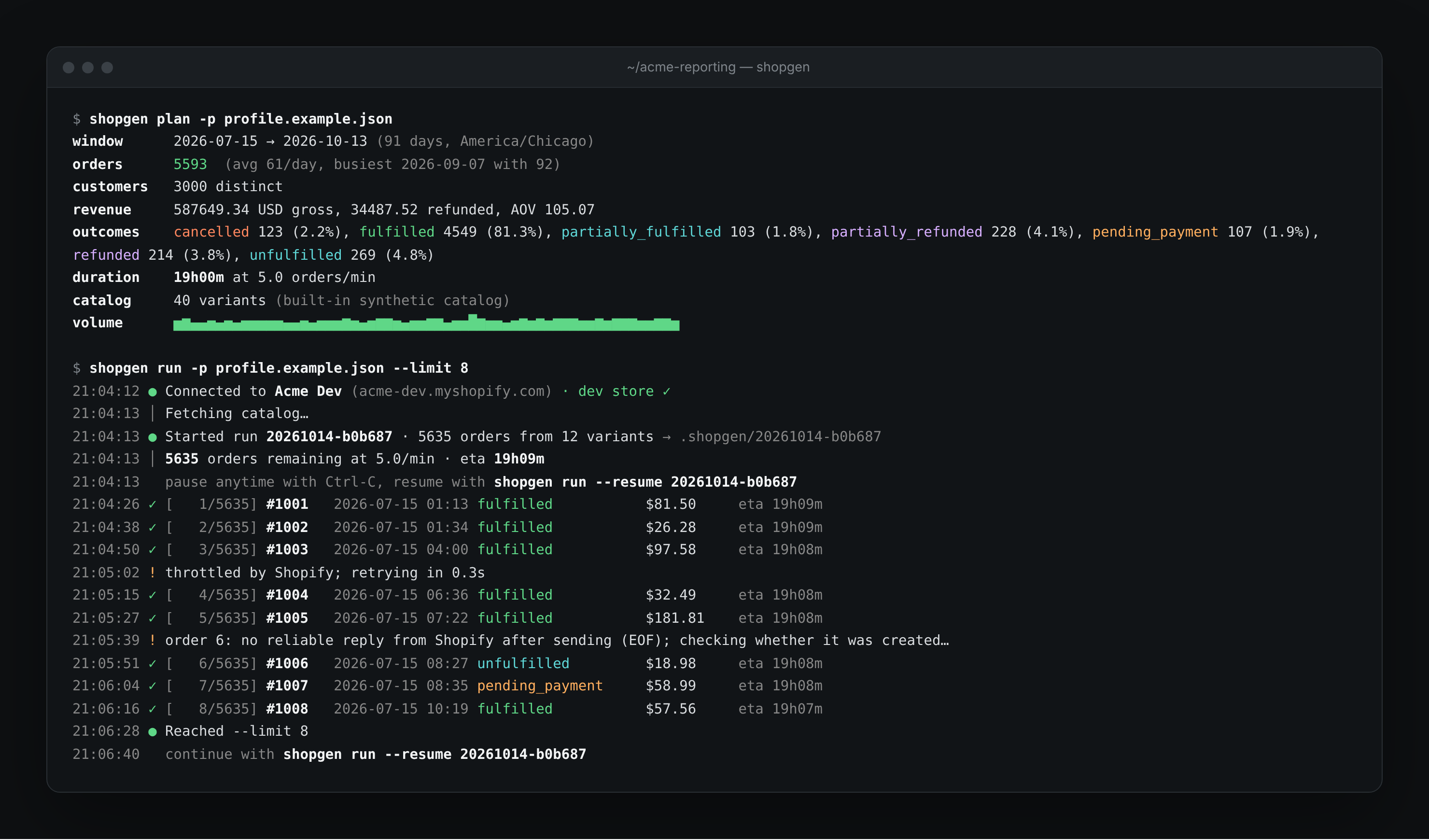
4. Write a profile and preview it. Start from the example (90 days, 60 orders a day, +25% growth, a Labor Day spike). plan prints what it would create; nothing is written.
curl -fsSLo profile.json https://raw.githubusercontent.com/weekwright/shopgen/main/profile.example.json
shopgen plan
window      2026-07-15 → 2026-10-13 (91 days, America/Chicago)
orders      5593  (avg 61/day, busiest 2026-09-07 with 92)
customers   3000 distinct
revenue     587649.34 USD gross, 34487.52 refunded, AOV 105.07
outcomes    cancelled 123 (2.2%), fulfilled 4549 (81.3%), partially_fulfilled 103 (1.8%), ...
duration    19h00m at 5.0 orders/min
Without a store, plan uses a built-in 40-variant catalog, so you can design a profile before connecting anything.
5. Smoke test, then run.
shopgen run --limit 3            # three orders: check them in the admin
shopgen run --resume <run-id>    # carry on with the same run
Press Ctrl-C at any time. shopgen finishes the order in flight, saves its place and prints the exact resume command. A second Ctrl-C abandons the in-flight request; resume works out whether it landed.
6. Clean up.
How it works#
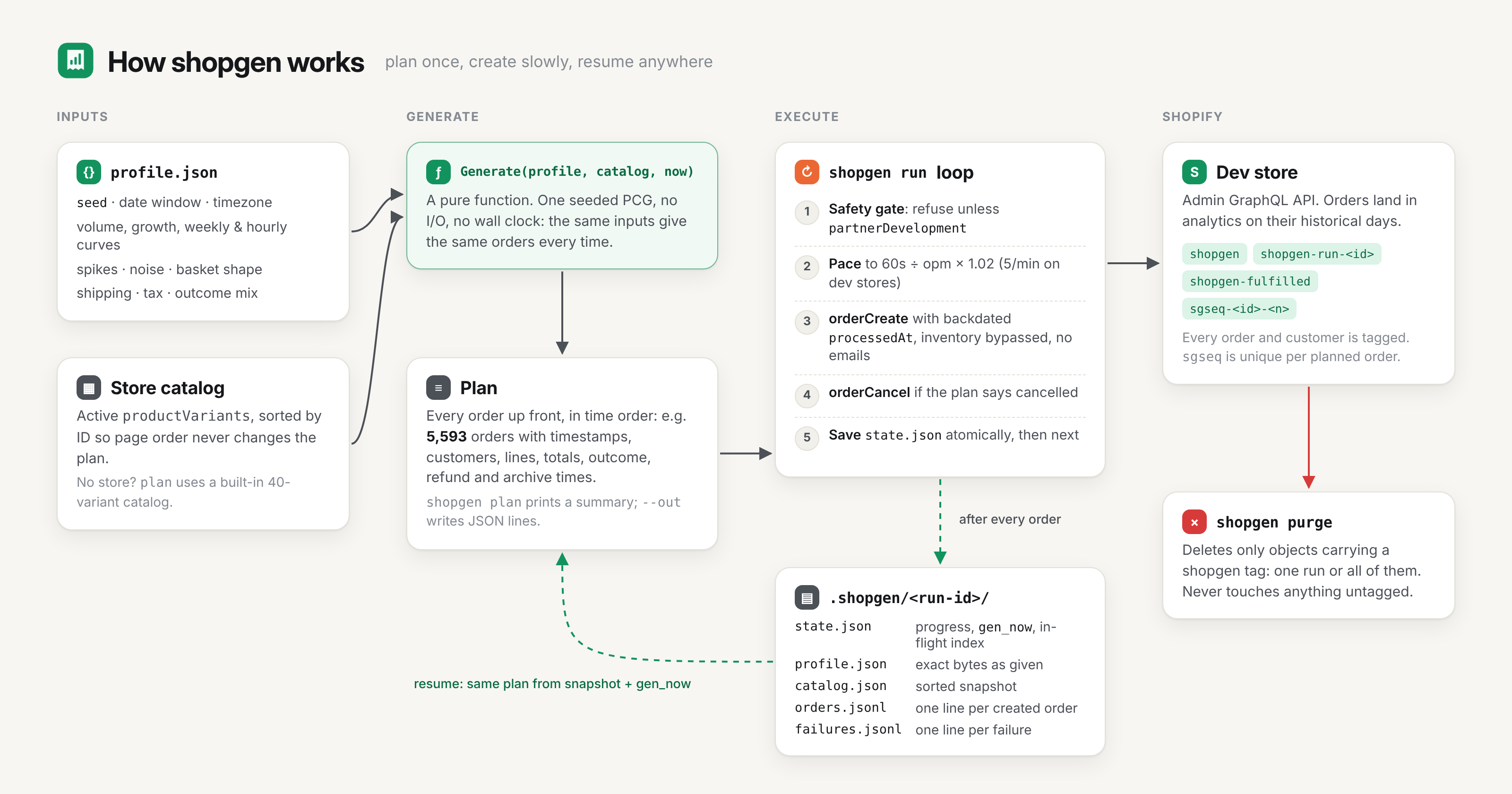
- Generate.
Generate(profile, catalog, now)builds the entire history in memory: every order's timestamp, customer, lines, totals and outcome. It uses one seeded PRNG and no I/O, and the catalog is sorted by variant ID, so the result never depends on API page order or the wall clock. - Snapshot. A new run gets an ID like
20261014-a1b2c3and a directory in.shopgen/holding the exact profile bytes, the sorted catalog andgen_now, the reference time it was generated with. - Create. The loop paces
orderCreatecalls to 5 per minute (plus 2% headroom), cancels the orders the plan says are cancelled, and rewritesstate.jsonatomically after every order. - Resume. Resume never re-reads your profile or re-fetches the catalog. It regenerates the identical plan from the snapshot and
gen_nowand continues from the next index.
Every order carries a unique sgseq-<run>-<index> tag. When a create may have committed but no reply arrived (a dropped connection, a 502), shopgen looks the order up by that tag instead of retrying blindly. That's how a run stays free of duplicates even across crashes.
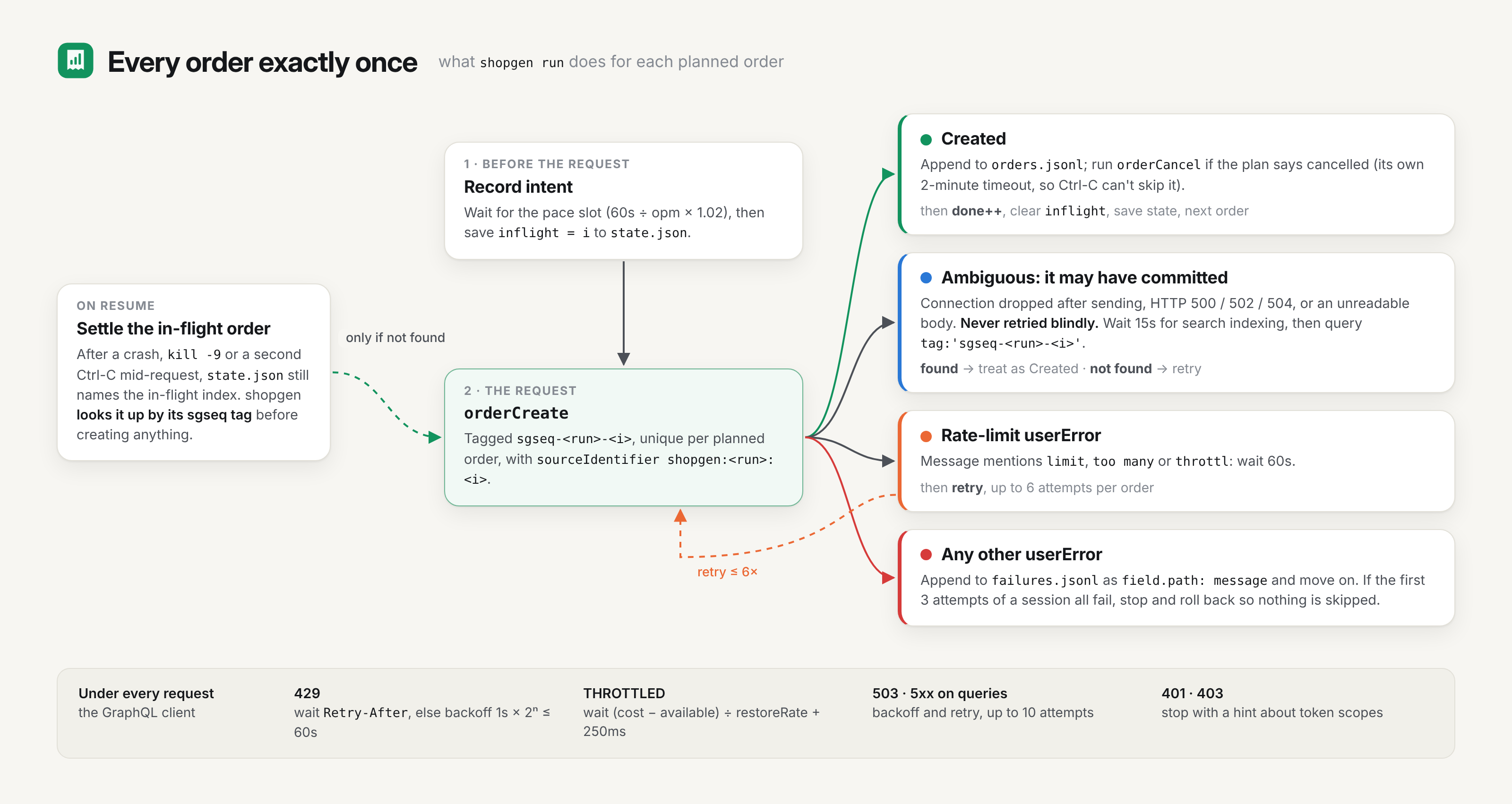
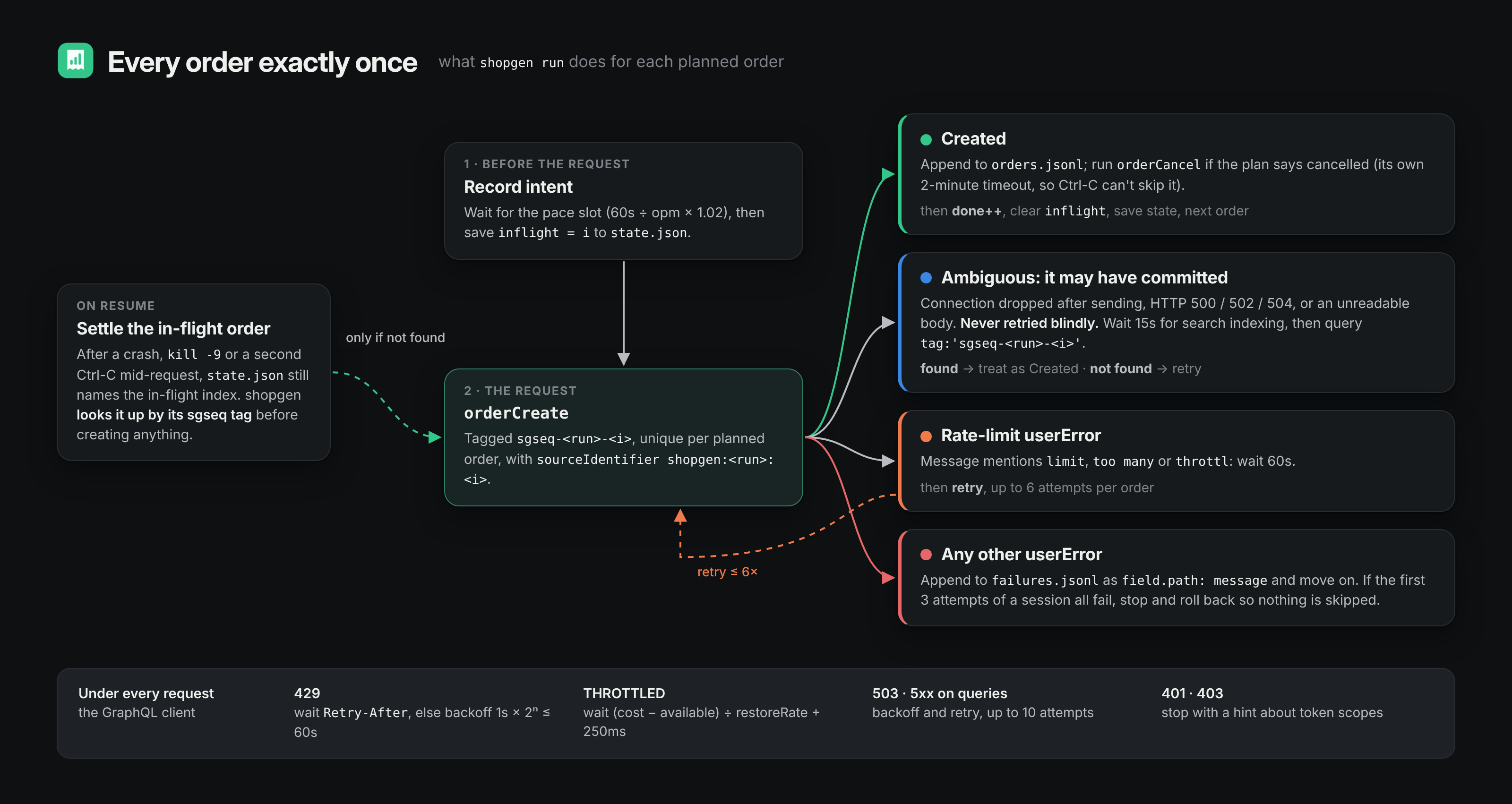
More detail, including the volume formula, the GraphQL client's retry rules and the code layout: docs/how-it-works.md.
Profiles#
A profile is one JSON file. Everything except start and orders_per_day has a default, and invalid values are rejected at load time with a message naming the field.
{
  "seed": 42,
  "start": "2026-07-15",
  "end": "2026-10-13",
  "timezone": "America/Chicago",
  "orders_per_day": 60,
  "growth": 0.25,
  "spikes": [{ "date": "2026-09-07", "days": 1, "multiplier": 2.2 }],
  "tax_rate": 0.0825,
  "customers": { "pool": 3000, "repeat_rate": 0.32 },
  "items": { "min": 1, "max": 5 },
  "free_shipping_over": 75,
  "archive_fulfilled": true
}
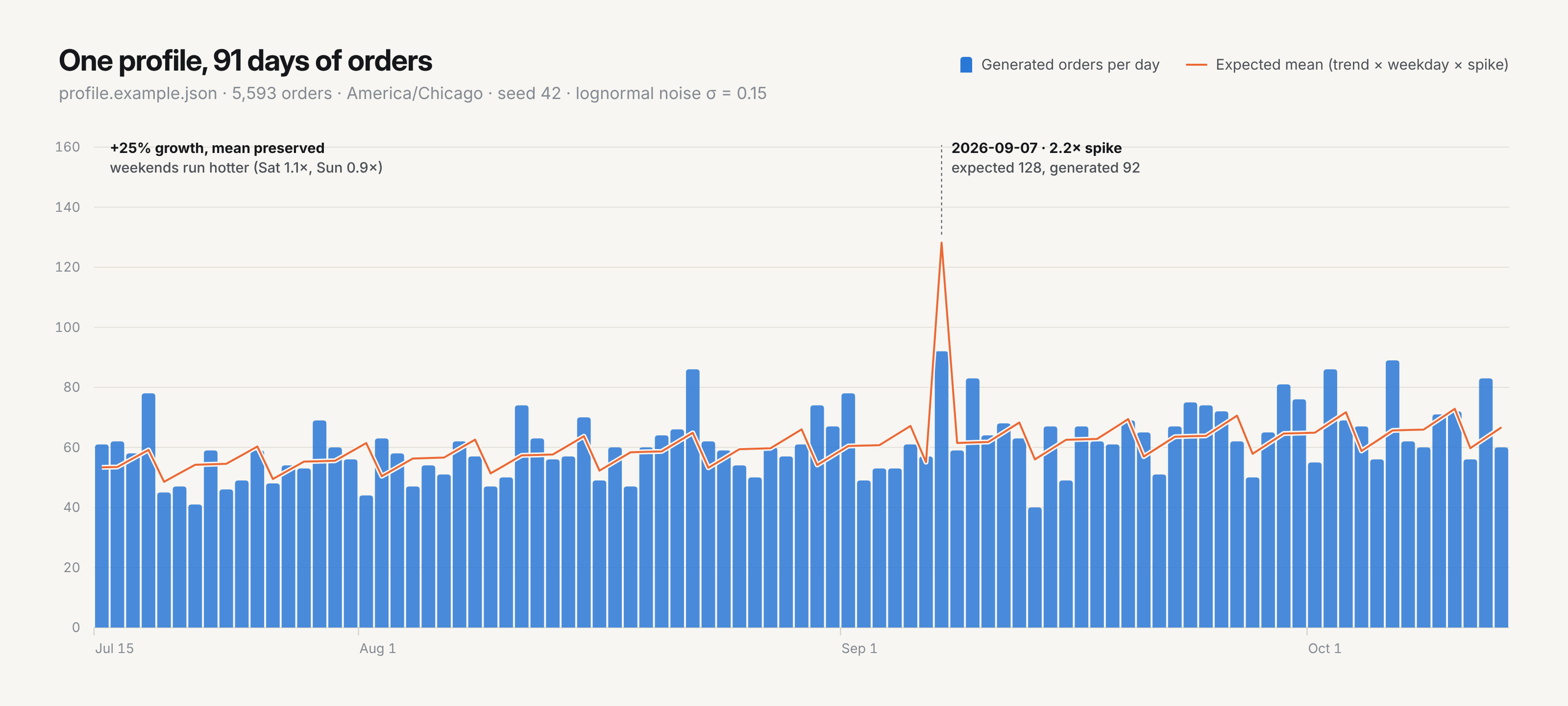
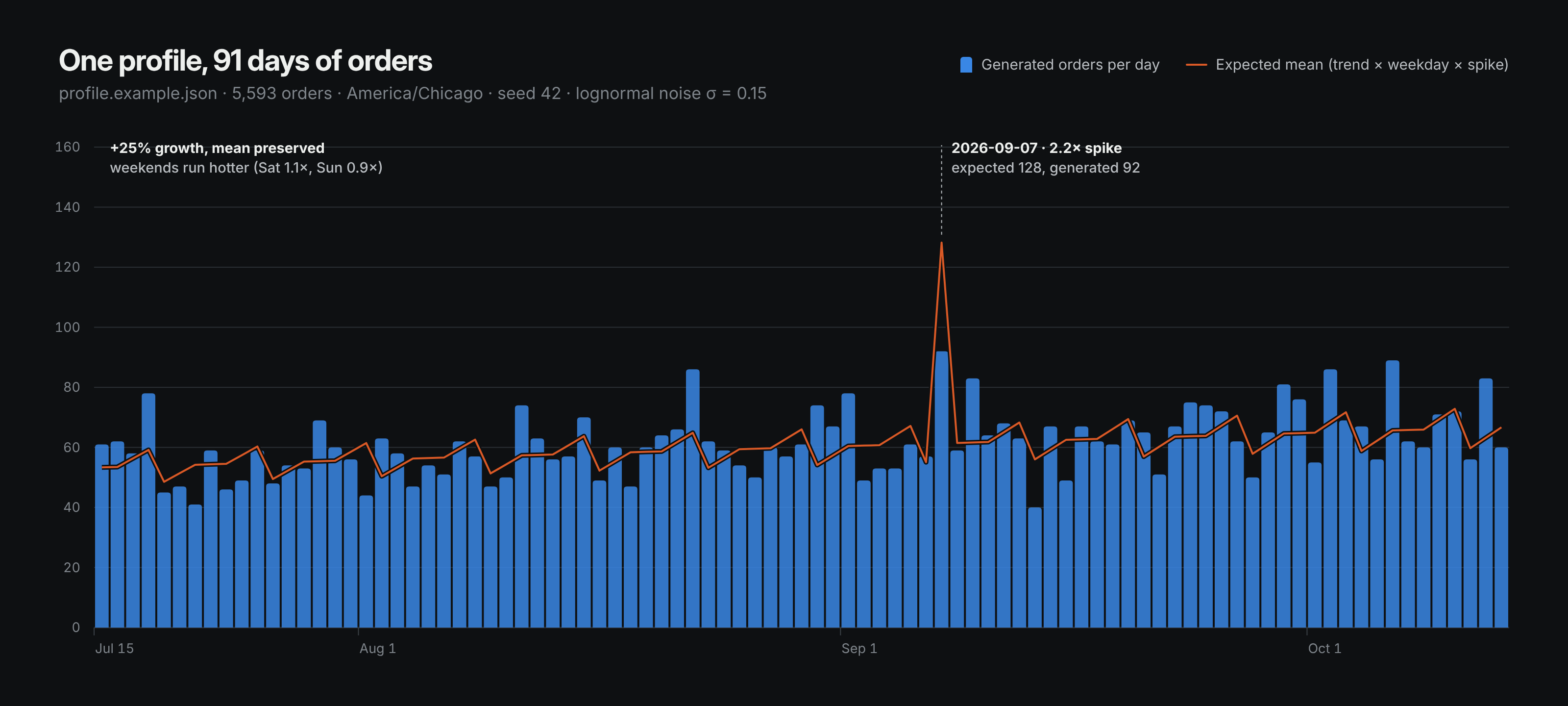
Daily volume is the mean × a linear growth trend × the weekday multiplier × any spike × lognormal noise. Each order then gets an hour from an evening-peaked curve, a customer, a basket, shipping, tax and an outcome. See the profile reference for every field. examples/ has ready-made profiles for a smoke test, a holiday season and a refund-heavy store.
What the orders look like#
| Outcome | Default share | financialStatus |
fulfillmentStatus |
Transactions | After create |
|---|---|---|---|---|---|
fulfilled |
82% | PAID |
FULFILLED |
sale | |
unfulfilled |
4% | PAID |
sale | ||
partially_fulfilled |
2% | PAID |
PARTIAL |
sale | |
pending_payment |
2% | PENDING |
none | ||
refunded |
4% | REFUNDED |
FULFILLED |
sale + full refund | |
partially_refunded |
4% | PARTIALLY_REFUNDED |
FULFILLED |
sale + partial refund | |
cancelled |
2% | PAID |
sale | orderCancel |
Recent orders skew unfulfilled, as in a real store: an order younger than fulfillment_lag_days is still unfulfilled with probability 1 − age/lag. Refunds land 2–20 days after the sale, and with archive_fulfilled orders are closed 3–10 days later.
Every order is tagged shopgen, shopgen-run-<id>, shopgen-<outcome> and sgseq-<id>-<index>, and has sourceIdentifier: shopgen:<id>:<index>. Customers are upserted by email (first.last.<n>@shopgen.example), so repeat orders link to one customer, and are tagged too. Addresses are real US city/state/ZIP combinations so address validation passes.
Safety#
- Dev stores only. Before any write, shopgen checks
shop.plan.partnerDevelopmentand stops if it's false.--allow-non-devoverrides this for paid staging stores. - Scopes first. Before any write, shopgen lists the token's granted scopes and stops if one is missing, rather than failing on order one.
- No emails, no stock changes. Every create sends
sendReceipt: false,sendFulfillmentReceipt: falseandinventoryBehaviour: BYPASS; cancellations usenotifyCustomer: false. - Undeliverable addresses.
email_domainmust be a reserved domain (.example,.test,.invalid,example.com, …), so no generated email can reach a real inbox. - Secrets stay out of history and files. Tokens and client secrets are read only from the environment.
- Purge is scoped. It only deletes objects carrying a shopgen tag and asks you to type
deletefirst.
Known limits#
These are deliberate in v1:
- Refunds are transactions, not Refund objects. Financial reports see them; line-level return reports don't.
cancelledAtis the run's time. Shopify sets it whenorderCancelruns; it can't be backdated.- Today's prices. Every line uses the variant's current price; there are no discount codes yet.
- US addresses only, and amounts assume a two-decimal currency.
- One order per call. The 5/min cap makes batching pointless on dev stores; paid staging stores can raise
--opmtogether with--allow-non-dev.
FAQ#
Why does a 90-day profile take 19 hours? Shopify caps orderCreate at 5 calls per minute on development and trial stores. plan and doctor print the duration up front. Run it overnight in tmux or screen; it's built to be stopped and resumed.
My Dev Dashboard token expires after 24 hours. Will a long run fail? No. With SHOPIFY_CLIENT_ID and SHOPIFY_CLIENT_SECRET set, shopgen renews the token five minutes before it expires, and again on any 401.
Will the same profile give the same orders next week? For a window that ended more than fulfillment_lag_days ago, yes, exactly. Generation takes "now" as an input (orders can't be in the future, and recent ones skew unfulfilled), so a window ending today shifts slightly as the clock moves. A run records its gen_now once and reuses it on every resume, so a run's plan never changes.
Can I point it at my production store? Not by accident: it refuses non-dev stores unless you pass --allow-non-dev on the command line. Please don't.
Do test orders show up in analytics? Shopify hides test: true orders from analytics, so shopgen sends test: false by default. Set "test_orders": true if you want them flagged.
What if my store has no products? doctor and run stop with a message asking you to add some. shopgen reads your catalog; it never creates products.
Built with#
cobra and viper for the command line and configuration, lipgloss for terminal styling, and go-shopify for store-name helpers and the access-scopes endpoint. Order creation uses shopgen's own small GraphQL client in internal/shopify, because its retry rules (never resend a mutation that may have committed) are the core of the exactly-once guarantee.
Contributing#
Issues and pull requests are welcome. See CONTRIBUTING.md. The test suite runs offline against a fake Admin API (shopifytest):
License#
MIT. shopgen is an independent project and is not affiliated with or endorsed by Shopify.